Updated
Choose an attachment in this order: define the job, select an attachment category, identify the exact equipment, then verify the proposed combination. A Deere brand name or a similar model label does not establish compatibility. Record which requirements have supporting documents and which questions remain unanswered.
1. Describe the job
Record:
- the material or surface;
- working width;
- terrain;
- lift height;
- required PTO or hydraulic functions;
- frequency of use.
Use the job description to rule out attachment categories that do not match the work before comparing models.
2. Identify the machine and attachment
Read the tractor or mower model and PIN from the machine’s identification plate. Add the model year if known and the fitted loader or hitch model. Record the attachment’s model and identification or serial number as well. Include any proposed adapter in the record. A listing title or photograph cannot replace those identities.
Collect accessible identification details and ground-level dimensions for the inquiry. Follow the machine’s shutdown instructions before reading its labels. Measurements and photographs support the record; they do not establish compatibility.
Equipment & supplies
Tools for checking tractor attachments
Record dimensions, visible condition and identification numbers before comparing the complete equipment offer.

Komelon Self Lock tape measure
Record accessible ground-level dimensions for an equipment and site discussion with a dealer or rental provider.

Ullman HTC-2 inspection mirror
Read an accessible identification plate from another angle when collecting details for the matching manual.

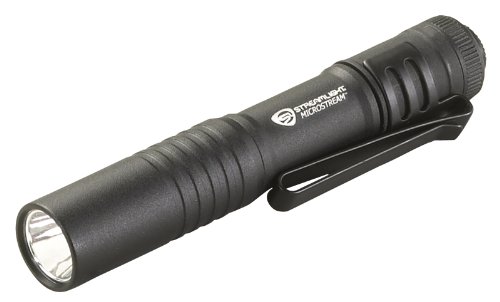
Streamlight MicroStream pocket light
Read accessible identification and warning labels after following the machine's shutdown instructions.


As an Amazon Associate I earn from qualifying purchases.
3. Verify the interface and power
- Mounting: confirm the hitch category, quick-hitch, subframe, loader carrier, or mower attachment point.
- PTO: check shaft type, speed, direction, horsepower requirement, and guarding where the implement is PTO-driven.
- Hydraulics: match couplers and the flow/pressure requirements stated for the implement.
- Capacity: compare attachment weight and working load with the machine and loader limits in the applicable manual.
- Clearance: check tire, frame, lift, transport, and storage clearances for the installed configuration.
A loader-mounted tool also needs the correct carrier interface and a compatible loader. A hitch-mounted implement may need a specific subframe or power connection. Do not assume that an adapter makes an unsupported combination safe.
4. Confirm the exact combination
Compare the attachment publication with the machine’s PIN and model year. Consult the applicable machine and attachment publications; ask a dealer to resolve unanswered serial or configuration questions. Do not buy on an assumption of fit when an interface, capacity, or operating requirement is unclear.
Keep a separate record for each proposed machine and attachment pair, with the source beside the configuration it describes.
| Record | Details to retain |
|---|---|
| Equipment pair | Host model and PIN; attachment model and identification or serial number; fitted loader, hitch and proposed adapter. |
| Application | Model year if known, serial/PIN range, region and configuration conditions stated in the publication. Mark missing conditions as unresolved. |
| Source | Publication title, edition or date, page or section, and the requirement it supports. |
| Check result | Requirement, recorded equipment detail, and status: documented, unresolved or conflicting. |
| Next question | The missing or disputed requirement and the document or confirmation requested from the supplier or dealer. |
“Documented” means the record includes evidence for that field. It is not approval of the complete combination. Use “unresolved” when evidence is missing or its application is unclear, and “conflicting” when sources disagree. Retain both sources for a conflict and ask which applies to the identified equipment; do not choose the more favorable value.
Send the supplier or dealer the equipment identities, fitted equipment, intended job and publication reference. Name the unresolved requirement and ask for the applicable document or confirmation for that pair. Leave the requirement unresolved until the relevant evidence is available.
Continue with the guide for the question you are checking:
- Tiller selection: collect tractor and tiller application evidence.
- Quick-attach connections: distinguish the interfaces in the proposed setup.
- Pallet-fork selection: examine the fork assembly and complete offer.
- Loader specifications: check the conditions attached to a rating.
- Equipment buying guides: compare offer scope and written terms after identifying the equipment.
- Attachments and implements: browse the attachment categories and existing guides.
Begin the publication search in Deere’s . The catalogue is a starting point, not confirmation that the proposed combination fits.