Updated
Deere’s February 2005 North American TM2024 covers X495/X595 diesel tractors. .
For a used X495, check the machine being offered: its steering configuration, installed engine and included equipment. A model name helps begin that inquiry; it does not settle the identity or condition of every fitted component.
Does AWS describe this tractor?
Deere’s January 2004 interchangeability chart lists X495 and X495AWS separately. .
The dated distinction is real. Applying it to a particular sale listing still requires evidence. Ask the seller which steering configuration is present and request photographs showing the relevant assembly alongside the tractor’s readable identification. A photograph that hides the rear mechanism leaves that question open.
Keep drive and steering descriptions separate. A seller’s “2WD” statement does not establish “2WS.” Nor do straight rear wheels in one photograph settle how that axle steers. If the advertised label and available evidence disagree, resolve the configuration before comparing listings or ordering steering components.
Identify the installed engine
TM2024 includes 3TNE74 and 3TNV76 sections, without mapping them to your PIN.
Record the full tractor product identification number (PIN) and the installed engine’s identification. Ask about replacement-engine work and keep any supporting invoice with those identifiers. If the engine was changed, the original model description alone cannot settle the present parts application.
Give both identifiers to a Deere parts supplier when asking which current listing applies. A shared manual’s contents page is a route into the right documentation, not a serial-number decoder. Obtain the applicable operator information before selecting fluids, service intervals or maintenance procedures.
Which oil filter should you investigate?
Deere’s historical tune-up guide lists oil filter M806418 for X495/X595, with engine-dependent kit alternatives. .
Treat M806418 as a reference for the parts inquiry. Confirm the fitted engine, full PIN and current Deere part number before ordering. An Amazon product title establishes the listed item’s identity; its model-fit wording does not independently verify your tractor’s application.

John Deere M806418 oil filter
Before ordering, confirm the fitted engine, full PIN and current Deere part number.

As an Amazon Associate, MyGreen Farm earns from qualifying purchases.
Separate the deck from the equipment included in the sale
Identify the mower deck or implement itself rather than assigning it specifications from the tractor name. Request readable equipment markings and ask what mounting and drive components accompany it.
| Seller’s statement | Follow-up before agreeing the equipment list |
|---|---|
| “The deck is included.” | Which identified deck, and which loose or fitted mounting parts come with it? |
| “An attachment fits.” | Which installation is being described, and what current application evidence supports it? |
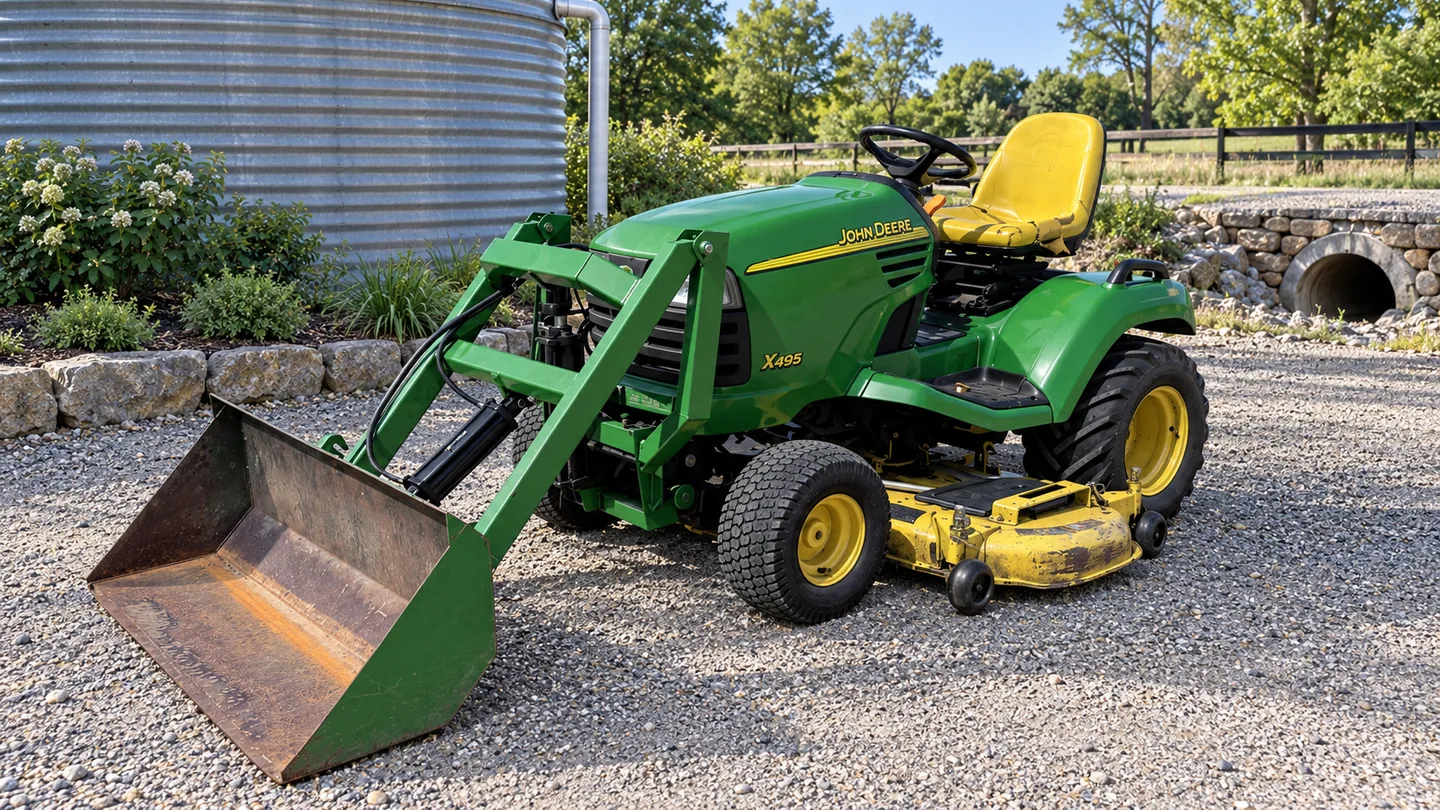
| “Everything pictured comes with it.” | Does the written list include the implement and associated parts shown separately? |
Use the dated chart as historical context, not approval for a present installation. A photograph of an implement beside a tractor does not establish a complete working combination. Keep an unresolved attachment question separate from the tractor’s basic identity.
If the tractor is identified but the deck is not, keep the deck outside the confirmed equipment comparison until its identity and included parts are settled. An unresolved engine match blocks an engine-parts order; it need not prevent documenting the rest of the tractor.
Decide what still needs assessment
Before agreeing a purchase, separate what is identified from what has actually been assessed. Request available repair records and clarify whether a claimed rebuild concerns the engine, another assembly or only a replaced component.
An identifier match does not certify condition. Ask a qualified technician to assess unresolved operation or unexplained modifications; a sale photograph and a historical reference cannot supply that assessment. Keep material uncertainties and the next inquiry in the purchase discussion. Do not treat an unresolved issue as included service or a confirmed repair.
For an existing owner, the same distinction keeps a parts request focused: identify the assembly, describe the question and obtain the current application answer before placing the order.
This was a great overview — I liked the deep dive into the AWS steering. I’m thinking about one for my 1.5-acre lot with some tight beds. Quick question: does the AWS make turning easier without tearing up flower beds along edges? Anyone used it on slopes?
Glad it helped, Maya. AWS is designed to reduce turf scuffing by allowing tighter, more controlled turns; that said, technique matters on slopes. Take it slow, avoid sharp lateral turns on steep grades, and use a slightly higher deck height near delicate beds.
Agree with Carlos. I live on a small hill and the AWS really helps, but I avoid mowing right after rain. Also use a mulching kit — less clumping near beds.
I have one and it’s a game changer for corners. Still, if the soil’s wet you’ll get wheel marks — common sense stuff. On slopes, it’s fine as long as they’re gentle. Don’t push it.
I’m torn between the X495 AWS and a commercial walk-behind mower for a 2-acre property. The article helps but I’m wondering about speed vs finish quality. Thoughts?
Both have pros and cons. The X495 gives more comfort, attachment versatility, and faster coverage for light-to-moderate terrain. A commercial walk-behind can give a superior finish in some cases and handle heavier duty daily work. Consider terrain, desired finish, transport needs, and average run time.
If aesthetics are top priority (like a golf-green finish), the walk-behind or a professional service might be better. For general yard care and attachments, go tractor.
Engine felt solid in the specs. But the ownership cost section made me pause — fuel, blades, oil changes, belts… anyone tracking real yearly costs? Ballpark numbers would help. I’m not great at math lol.
Thanks for the question, Carlos. The buying guide tries to account for typical maintenance intervals — expect $250–$600 depending on use, climate, and whether you DIY or pay a shop.
If you do the oil change yourself and sharpen blades at home, you can keep it on the lower end. If you have a larger acreage or heavy use, costs climb fast.
I tracked mine last year: fuel ~ $120, oil & filter ~ $60, blades sharpened twice ~$40, belts/filters spare ~$80. So somewhere around $300–$400 for light to moderate use. YMMV.
Is there any real downside to AWS other than cost? Feels like a win-win — better turning, less turf damage. I’m skeptical of ‘too-good-to-be-true’ tech.
Good skepticism. Downsides: higher initial cost, slightly more complex maintenance (additional steering components), and potential for higher repair bills if neglected. But for many owners, benefits outweigh these cons.
Also more moving parts = more things that can fail. If you treat it well, though, it’s solid.
If your yard’s super simple, you might not need it. For obstacle-heavy or irregular lawns, AWS shines.
Not a big fan of manufacturer blurbs but the article was balanced. One critique: could use more photos or diagrams of the AWS system. Words only only go so far — visuals help!
100% agree. Videos are even better — seeing it in motion sells the benefit way faster than text.
Thanks Mark — noted. We tried to explain the kinematics clearly, but a follow-up with diagrams is a good idea. We’ll prioritize that for an update.
Bought an X400 series a while back and the upgrade path in the article (snow blade, bagger, trailer hitch) mirrors my experience. Really packages this as a versatile tool — not just a mower. Also: watch the PTO safety shield — mine cracked and was annoying to replace.
If you can, keep spare small parts like shields and belts on hand. Saves a week of downtime during peak season.
Thanks for sharing that real-world feedback, Lucy. Small parts like shields can be easy to overlook but matter for safety and longevity.
Humor me: how does it compare to a zero-turn mower? I love the idea of AWS, but will it ever match the pivot-turn elegance of a ZTR? Asking for a friend (and my lawn). 😅
If you have lots of curves and only mow, ZTR. If you need utility, tractor (especially AWS) is a great compromise.
Short answer: not exactly. Zero-turn mowers have a smaller turning radius because they pivot on the rear wheels, which is unmatched for speed and maneuvering in open lawns. AWS bridges the gap for tractor owners by improving maneuverability while keeping the versatility of a tractor (attachments, towing, better ride).
I swapped from a ZTR to a tractor when I needed snow and towing capabilities. I miss the super-tight turns, but I don’t miss the lack of attachments.
Anyone here used the X495 with a snowblower attachment? I’m in the North and winter work is a big plus for me. How does it handle deep, wet snow?
Snowblower compatibility and performance varies with blower size and engine load. The X495 can handle a mid-sized blower for most residential needs, but for heavy commercial snow clearing you’d want a larger unit.
I had a similar Deere with a snowblower. It handles powder and moderate wet snow fine; deep, heavy wet snow can bog it down if you’re under-powered. Keep weight on the front and take steady passes.
Also consider tire chains in icy conditions. They make a big difference for traction, especially when pushing snow.
Okay, real talk: maintenance tips section saved me. I used to ignore deck leveling and my cut looked awful. Follow-up: any pro tips for storing over winter? I’ve heard about fuel stabilizer and battery maintenance 🤔
Also change oil before storage so old contaminants aren’t sitting in the engine all winter.
Caveat: If you run a diesel (not the X495), extra steps needed. But fuel stabilizer + tender + clean = good starting point.
I put my machine on jack stands, remove blades, and spray a light oil on the deck to prevent rust. Battery tender is a must imo.
Yes — stabilizer for the fuel, run the engine a bit to circulate it, disconnect battery or use a maintainer, clean/grease exposed points, and store indoors if possible. Remove mower decks or prop them for airflow if stored outside.
I appreciated the troubleshooting list — it covered the usual suspects: belt squeal, uneven cut, battery issues. One tiny gripe: no mention of common electrical gremlins after aftermarket stereo installs lol.
Ha — good call. We assumed stock setups, but aftermarket electrical mods often cause shorts or charging issues. We’ll add a note about avoiding ad-hoc wiring and using proper fuses.
I once fried a regulator with a cheap radio install. Lesson learned: get wiring harnesses and keep things fused.
Love the attachments list — wish the article had more on quick-attach compatibility. Is there a standard, or do you need model-specific adaptors? Also, the troubleshooting tips were super useful.
Great point, Elaine. Many attachments are model-specific or require John Deere adapters. The X495 uses a specific 3-point/hitch interface for larger attachments; for smaller implements (snow blowers, front blades) check fitment charts or dealers.
Most aftermarket vendors list compatibility by model. I bought a bark blower for my X4xx series and had to use an adapter — dealer installed it in 20 minutes.
Hmm. I liked the part about maneuverability but the article glossed over the turning radius numbers. Anyone know the exact radius with AWS vs without? Curious if it’s worth the extra $ for my small yard.
If you’re on the fence, test drive both. Numbers mean less than how it feels in practice. The AWS felt almost like a zero-turn when navigating flower beds.
I compared brochures last month: AWS felt like a 20–30% improvement in tight areas. If your yard has lots of obstacles, I’d say it’s worth it.
The article focused more on practical benefits than raw specs, but good call — AWS reduces the effective turning radius significantly. Exact numbers vary with deck width and configuration; a dealer can provide spec sheets comparing X495 AWS to equivalent 2WD models.
Small nitpick: the article used a few industry terms without quick definitions (e.g., PTO, deck lift). Newbies might get lost. Otherwise solid read!
I thought PTO was ‘Power Take-Off’ but had to Google. A glossary would be clutch for new owners.
Good feedback, Aisha. We’ll add a short glossary for common terms and acronyms in the next revision. Thanks!
Yep — little explainer boxes would make the piece friendlier.
Long comment — because I have a long list of things from owning tractors for 10+ yrs:
1) Keep a maintenance log (dates, hours, services).
2) Grease points save lives (and bearings).
3) Deck belts should be inspected every season.
4) For AWS models, check the steering actuator seals yearly.
5) Buy a cheap hour meter if yours doesn’t have one.
I wish this article had a printable checklist like the one above. Might make an editive? 😉
Fantastic checklist, Tina — thank you. A printer-friendly maintenance checklist is a great idea; we’ll look into adding a downloadable PDF in a follow-up.
Number 4 is gold. Steering seals are easy to miss until they leak.
Agree with number 1 — the log becomes invaluable when selling or diagnosing a problem later.